Development environment
All routine tasks go through just. Run just with no arguments
to list every recipe, grouped. Recipes shell out via uv run, so they pick up the
QGIS-aware virtual environment.
Windows-first — the recipes run on PowerShell 7 — but the same
justrecipes work on Linux. macOS is not supported for environment creation, becauseqgis-venv-creatorhas no macOS backend.
Prerequisites
A QGIS 4 installation (it ships the Python interpreter the virtual environment is built from).
PowerShell 7 (
pwsh) — the interpreterjustuses for its recipes.
On Windows the first-time setup below can provision uv, just and pwsh for you.
First-time setup
From a freshly cloned repository, a single command creates the virtual environment and wires everything up.
On Windows, scripts/venv_setup.ps1 provisions the prerequisites (via
Scoop) and then runs just bootstrap:
powershell -ExecutionPolicy Bypass -File .\scripts\venv_setup.ps1 "C:\Program Files\QGIS 3.40.15\apps\qgis-ltr"
If uv, just and pwsh are already installed, call just bootstrap directly:
just bootstrap "C:\Program Files\QGIS 3.40.15\apps\qgis-ltr"
The argument is the path to the apps/qgis or apps/qgis-ltr folder inside the QGIS
installation. An optional second argument is a QGIS profile folder to wire into .env:
just bootstrap "C:\Program Files\QGIS 3.40.15\apps\qgis-ltr" "$env:APPDATA\QGIS\QGIS4\profiles\plg_dev"
Platform note. The QGIS path is only consumed on Windows. On Linux,
qgis-venv-creatorignores it and builds a--system-site-packagesvenv frompython3onPATH; macOS is unsupported upstream.
just bootstrap chains these recipes (each runnable on its own):
install-uv— install or updateuv.create-venv— create.venvwithqgis-venv-creatorso it inherits the QGIS Python’s site-packages andqgis.pth.setup-env-vars— write the git-ignored.env(see below).install-debugpy— installdebugpyinto the user site-packages visible to the QGIS Python.customize-pth— append the QGISprocessingand GRASS Python directories toqgis.pthso the venv can import them.install-hooks— install the prek-managed git hooks.
Environment variables (.env)
just setup-env-vars autodetects sensible defaults and writes them to .env (loaded
automatically by just). Run just setup-env-vars --help for the options. It sets:
QGIS_EXECUTABLE_PATH— the QGIS application binary.QGIS_PROFILES_DIR— the directory holding QGIS profiles.DEVELOPMENT_PROFILE_NAME— the profile used byjust deploy/just qgis(defaultdefault).QGIS_DEBUGPY/QGIS_DEBUGPY_WAIT— debugpy attach toggles (see Debugging).
To target a specific profile, pass it explicitly:
just setup-env-vars --qgis-settings-dir "<path-to-profile>".
Managing dependencies
Dependencies and their groups are declared in pyproject.toml and pinned in uv.lock:
just sync   # uv sync --frozen  — install exactly what uv.lock specifies
just lock   # uv lock --upgrade — bump uv.lock to the latest compatible versions
Running the plugin in QGIS
just deploy mirrors the stratified_packager/ source into the profile’s plugin
directory ($QGIS_PROFILES_DIR/<profile>/python/plugins/stratified_packager); just qgis
launches QGIS with that profile:
just deploy [profile]   # mirror the source into the profile's plugins directory
just qgis   [profile]   # launch QGIS with the profile
just run    [profile]   # deploy + qgis
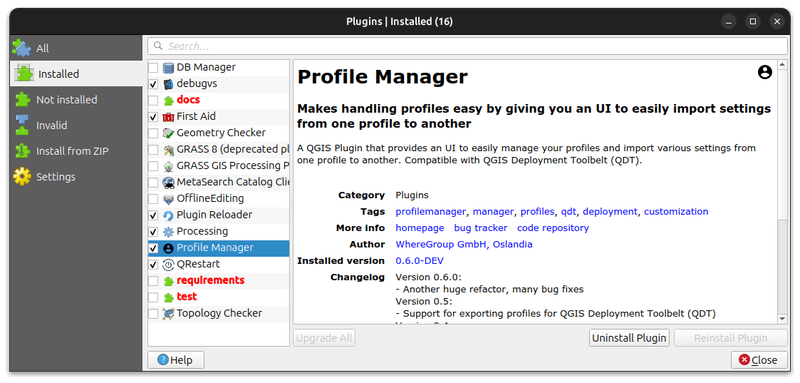
profile defaults to DEVELOPMENT_PROFILE_NAME from .env. The first time, enable the
plugin in Plugins ▸ Manage and Install Plugins (ignore invalid-folder warnings for
docs, tests, etc.):
To exercise the Processing provider from the command line against the development profile,
deploy first and then use just qgis-process:
just qgis-process plugins                              # list providers/algorithms
just qgis-process run <provider>:<algorithm> -- --help # show an algorithm's parameters
Debugging
The plugin opens a debugpy listen socket on startup when QGIS_DEBUGPY is truthy (set
by setup-env-vars). Set QGIS_DEBUGPY_WAIT=1 to block QGIS startup until a debugger
attaches; leave it 0 to attach opportunistically. Tune the socket with
QGIS_DEBUGPY_HOST / QGIS_DEBUGPY_PORT if needed, then attach from your editor (e.g. VS
Code’s Python: Remote Attach).
Quality checks
just qa # format → lint → type-check
just qa runs format (ty --fix, ruff --fix, ruff format), lint (ruff,
flake8, pylint) and type-check (ty, mypy). The same checks run through the prek
hooks on commit. To run the full gate including the test suite, use just check (alias
just ci) — see Testing the plugin.
just clean removes build, test and cache artifacts; just clean-all additionally
removes everything git-ignored (including .venv).